
Introduction
Managing smartphones, recovering lost data, transferring files, unlocking devices, and maintaining digital security have become essential tasks for modern users. Whether you own an iPhone, iPad, Android smartphone, or tablet, there may come a time when you need specialized software to recover deleted files, transfer data, fix system issues, or manage your device more efficiently.
This is where iMobie comes into the picture.
iMobie is a software company known for developing powerful mobile management and recovery tools designed to simplify device maintenance. Over the years, the company has built a strong reputation among users looking for solutions to common smartphone problems such as data loss, system crashes, device transfers, screen lock issues, and backup management.
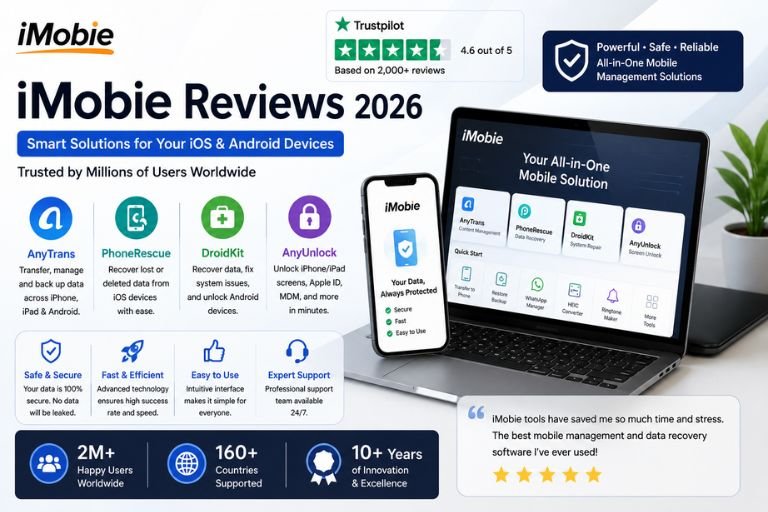
With millions of users worldwide, iMobie has become one of the most recognized names in mobile utility software. Its popular products include AnyTrans, PhoneRescue, DroidKit, AnyUnlock, and several other tools aimed at helping users solve technical problems without requiring advanced technical knowledge.
But is iMobie really worth your money in 2026?
In this detailed iMobie review, we will explore its products, features, performance, ease of use, customer support, pricing, advantages, disadvantages, and overall value.
What Is iMobie?
iMobie is a software development company specializing in mobile device management, data recovery, system repair, and device optimization tools.
The company offers various products that help users:
- Transfer files
- Recover deleted data
- Unlock devices
- Repair operating systems
- Manage backups
- Clean storage
- Migrate data between devices
Unlike basic mobile management applications, iMobie focuses on providing comprehensive solutions for both everyday users and professionals.
Its tools support:
- iPhone
- iPad
- Android smartphones
- Android tablets
- Windows computers
- Mac computers
The company’s software is designed to simplify complex technical tasks and make them accessible to non-technical users.
Why iMobie Is Popular
Several factors contribute to iMobie’s growing popularity.
User-Friendly Design
Most iMobie products feature simple interfaces that guide users through each step of the process.
Wide Range of Solutions
Instead of focusing on a single problem, iMobie offers tools for:
- Recovery
- Transfer
- Backup
- Unlocking
- Repair
Cross-Platform Compatibility
Many products work across both Android and iOS ecosystems.
Strong Success Rates
Many users report successful recovery of photos, messages, contacts, and files.
AnyTrans Review
AnyTrans is perhaps iMobie’s most popular product.
It serves as an all-in-one device management tool.
Users can:
- Transfer files between devices
- Manage backups
- Move content between iOS and Android
- Transfer WhatsApp data
- Organize photos
- Manage music libraries
Many users appreciate AnyTrans because it offers more flexibility than traditional device management solutions.
The software simplifies tasks that can otherwise be time-consuming or difficult.
AnyTrans Features
Some of the most popular features include:
Phone-to-Phone Transfer
Users can migrate data from one device to another quickly.
Backup Management
Create and manage backups without relying solely on cloud services.
App Management
Organize and transfer applications between devices.
Media Management
Control photos, videos, music, and documents from a computer.
WhatsApp Transfer
Move WhatsApp data between supported devices.
These capabilities make AnyTrans a versatile tool for smartphone users.
PhoneRescue Review
PhoneRescue is iMobie’s dedicated data recovery software.
Its primary purpose is helping users recover deleted or lost data.
Common recovery scenarios include:
- Deleted photos
- Lost messages
- Missing contacts
- Accidentally removed files
- System crashes
- Failed updates
Data loss can be stressful, and PhoneRescue aims to make recovery straightforward.
Data Recovery Performance
One of the most important questions is whether PhoneRescue actually works.
Many users report successful recovery of:
- Photos
- Videos
- Messages
- Contacts
- Notes
- Call logs
Recovery success often depends on:
- How recently the data was deleted
- Whether the storage has been overwritten
- Device condition
While no recovery software guarantees perfect results, PhoneRescue generally performs well compared to many competitors.
DroidKit Review
DroidKit is designed specifically for Android devices.
It combines multiple tools into one application.
Features include:
- Data recovery
- System repair
- Screen unlock
- FRP bypass
- Storage cleanup
Many Android users appreciate having multiple functions available in a single platform.
This eliminates the need to install several separate applications.
Android Repair Tools
Android issues can be frustrating.
DroidKit helps users resolve problems such as:
- Boot loops
- System crashes
- Black screens
- Frozen devices
The repair tools are designed to guide users through troubleshooting processes step by step.
This makes them accessible even to non-technical users.
AnyUnlock Review
AnyUnlock focuses on unlocking iOS devices.
Users often turn to this software when they:
- Forget passwords
- Encounter lock screens
- Face Apple ID issues
- Need to remove restrictions
The software aims to simplify device access recovery.
Many users report positive experiences with its unlocking capabilities.
Ease of Use Review
One of iMobie’s strongest qualities is usability.
The company clearly designs its products for ordinary consumers.
Most tools feature:
- Clean interfaces
- Guided instructions
- Visual workflows
- Simple navigation
Users generally do not need technical expertise to complete tasks.
This accessibility contributes significantly to the company’s popularity.
Installation Experience
Installation is typically straightforward.
The process usually involves:
- Download software
- Install application
- Connect device
- Follow guided instructions
Most users can begin using the software within minutes.
Performance Review
Performance is generally strong across the product lineup.
Users often report:
- Fast scanning
- Efficient transfers
- Stable operation
- Reliable backups
Large file transfers may take time depending on device size and connection speed.
However, overall performance remains satisfactory for most users.
Customer Support Review
Customer support is an important consideration for software products.
iMobie provides:
- Email support
- Help center
- User guides
- Tutorials
- FAQs
Many users describe support as:
- Helpful
- Responsive
- Professional
Detailed documentation helps users solve many issues independently.
Security Review
When managing personal data, security is essential.
iMobie emphasizes:
- Secure connections
- Data privacy
- Safe transfers
- Device protection
Many users appreciate being able to manage sensitive information without uploading everything to cloud services.
This can provide additional peace of mind.
Pricing Review
iMobie products are positioned as premium utilities.
Pricing varies depending on:
- Product selection
- Subscription type
- License duration
Options often include:
- Monthly plans
- Annual plans
- Lifetime licenses
Many customers find lifetime licenses particularly attractive because they eliminate recurring fees.
What Customers Love About iMobie
Positive reviews commonly mention:
Easy-to-Use Software
Simple interfaces make tasks easier.
Successful Data Recovery
Many users recover important files.
Reliable Device Transfers
Migration tools work efficiently.
Multiple Features
One software package often includes numerous tools.
Helpful Tutorials
Documentation supports beginners.
Cross-Platform Compatibility
Works with both Android and iOS devices.
Common Complaints
While iMobie receives many positive reviews, some criticisms exist.
Recovery Results Vary
Not all deleted files can be recovered.
Premium Pricing
Some users consider the software expensive.
Device Compatibility Issues
Occasional compatibility problems occur with newer devices.
Subscription Costs
Certain products require recurring payments.
Pros and Cons
Pros
- User-Friendly Interface
- Strong Data Recovery Tools
- Excellent Device Transfer Features
- Supports iOS and Android
- Comprehensive Product Lineup
- Reliable Performance
- Helpful Customer Support
- Multiple Licensing Options
Cons
- Recovery Success Not Guaranteed
- Premium Pricing
- Some Features Require Paid Plans
- Occasional Compatibility Issues
- Advanced Functions May Have Learning Curves
Who Should Use iMobie?
iMobie is ideal for:
- iPhone users
- Android users
- Students
- Professionals
- Content creators
- Small businesses
- Anyone concerned about data loss
The software is particularly useful for users who regularly manage large amounts of mobile data.
Final Verdict
iMobie remains one of the leading providers of mobile utility software in 2026. Its products offer practical solutions for data recovery, device management, file transfers, system repair, and unlocking challenges that many smartphone users face.
The company’s focus on simplicity, reliability, and functionality makes its software accessible to both beginners and experienced users. While pricing may be higher than some alternatives, many customers feel the convenience and effectiveness justify the investment.
For users looking for dependable tools to manage, recover, transfer, and protect their mobile data, iMobie continues to be one of the strongest software ecosystems available today.