Disclosure: This review contains affiliate links. If you sign up through them, Techeflows may earn a commission at no extra cost to you. Our reviews are research-based: we study the vendor’s published plans and feature lists, current pricing and public user feedback. Prices were checked in November 2026 and can change.
You can spend weeks tuning an ad campaign and still lose the sale in the last three seconds. The click arrives, the page loads slowly or says something different from the ad, and the visitor leaves.
Instapage exists to fix that last step. It is a landing page platform built for teams that pay for traffic and want every campaign to land on a page made for it.
It is also one of the more expensive tools in its category, with plans starting at $99 a month. So the real question is not whether Instapage is good. It is whether it is good enough to justify the price for a business like yours.
This Instapage review covers the features, the 2026 pricing, the limits that are easy to miss, what users say, and how it compares with a cheaper rival.
A card is required. Cancel within 14 days and you are not charged.
In this review
- Instapage Review: The Quick Verdict
- What Is Instapage?
- Instapage Features: What Do You Get?
- How Does Instapage Work?
- Instapage Use Cases: Where Does It Fit Best?
- How Much Does Instapage Cost in 2026?
- Which Instapage Plan Should You Choose?
- What Do Users Say About Instapage?
- Instapage Pros and Cons
- Instapage vs Leadpages: How Do They Compare?
- Who Is Instapage Best For?
- How to Get the Most From the 14-Day Instapage Trial
- Final Verdict: Is Instapage Worth It?
- Frequently Asked Questions About Instapage
Instapage Review: The Quick Verdict
Instapage is a polished, fast and flexible landing page builder with strong collaboration tools and, on higher plans, serious experimentation and personalization features. For marketing teams and agencies running paid campaigns at volume, it earns its place.
The trade-offs are cost and plan limits. The entry plan has no A/B testing and caps you at 15,000 unique visitors a month. Heatmaps are reserved for the custom-priced top plan. Small businesses that only need a few simple pages can get similar results for less elsewhere.
- Best for: performance marketing teams, agencies, and SaaS or ecommerce brands with a real ad budget.
- Think twice if: you are a solo creator, you need A/B testing on a small budget, or you send large volumes of low-cost traffic.
What Is Instapage?
Instapage is a cloud-based platform for building, publishing and optimizing landing pages without writing code. The company describes it today as an AI-powered marketing platform. Alongside landing pages, it covers websites, forms, popups, A/B testing, personalization and basic email marketing.
The company was founded in 2012 by Tyson Quick. In October 2023 it was acquired by airSlate, the business software group behind pdfFiller, signNow and DocHub. Instapage kept its name and continues to operate as its own product inside that group.
Its focus has always been what happens after the click. The idea is simple. Every ad, audience or keyword group should lead to a page that matches it, loads quickly and can be tested and improved.
Instapage Features: What Do You Get?
Drag-and-Drop Builder
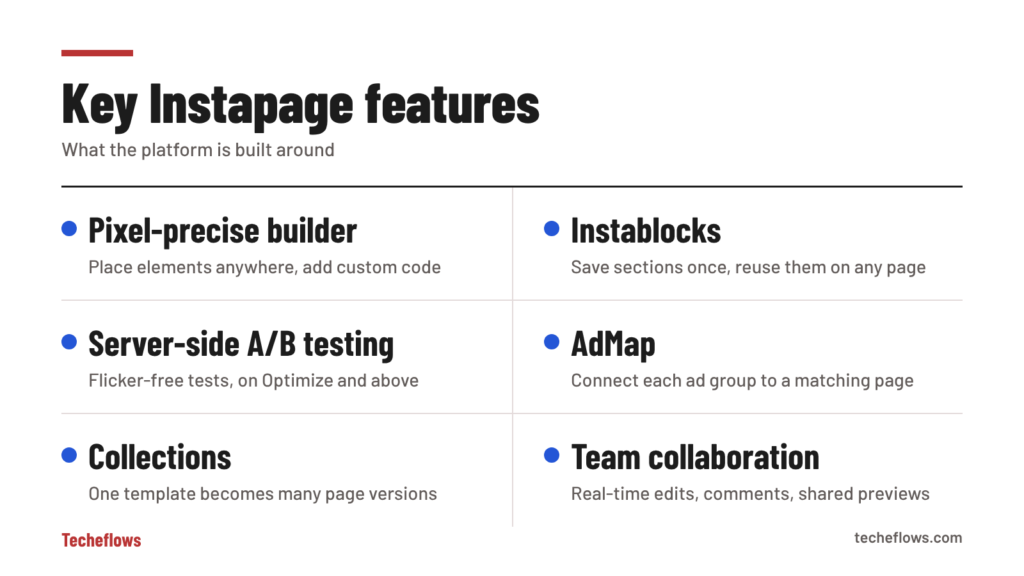
The editor is free-form. You can place any element exactly where you want it, down to the pixel, instead of being locked into rows and columns. Designers tend to like this because pages can match a brand precisely.
You can also add custom HTML, CSS and JavaScript, or drop in third-party scripts. The flip side of a free-form canvas is that you should always check the mobile version of a page and adjust it by hand where needed.
Templates, Instablocks and Global Blocks
Instapage offers more than 500 templates for lead generation, webinars, app downloads, ebooks, click-through pages and more.
Instablocks are reusable sections such as headers, testimonials and pricing tables that you can save and drop into any page. Global Blocks go one step further. Edit one of them once, and the change appears on every page that uses it. For teams managing dozens of pages, that saves hours. The plans page lists global elements under the Convert plan, so confirm what your tier includes before you rely on them.
AI Content
The built-in AI writes headlines, body copy and calls to action inside the builder. It can also generate full page variations, which you can feed straight into an experiment. It is a starting point for drafts, not a replacement for knowing your customer.
A/B Testing and AI Experiments
From the Optimize plan up, Instapage includes server-side A/B testing. Server-side testing avoids the brief flicker that script-based tools can cause when they swap content after the page loads.
You also get hypothesis setting, experiment history, custom traffic splits and scheduling. The platform’s AI experiments can route ad traffic toward the best-performing variation automatically.
AdMap
AdMap lets you see your campaign structure, including campaigns, ad groups and ads, and connect each one to a relevant landing page. It is aimed at advertisers who want message match at scale and do not want to track it in a spreadsheet.
Personalization and Dynamic Text
Dynamic text replacement swaps words on the page to match the keyword or ad that brought the visitor in. On the top plan, ad-to-page personalization shows different page experiences to different audiences. Instapage says personalized landing pages can lift conversions by up to 34%, which is the vendor’s own figure.
Collections
Collections turn one template into many pages. You build a page once with placeholders, then fill those placeholders by hand or with AI to create versions for different cities, industries or use cases. It is useful for local campaigns and for programmatic pages.
Page Speed
Instapage serves pages through its own back-end technology, the Thor Render Engine, which is designed to make pages load quickly on mobile. Speed has a direct effect on both conversion rate and ad quality scores.
Analytics and Heatmaps
The dashboard tracks visitors, conversions, conversion rate, cost per visitor and cost per lead. Heatmaps show where people click and how far they scroll, but they are included only on the Convert plan.
Collaboration
Team members can edit in real time, leave comments directly on the page and share secure previews with clients or stakeholders for approval. For agencies, this replaces long email threads full of screenshots.
Integrations and Security
Instapage connects to more than 120 apps. The list includes Salesforce, HubSpot, Mailchimp, Google Ads, Google Analytics, Zapier, Slack, Shopify, WordPress and Zendesk. The company also states that it complies with GDPR and CCPA requirements.
How Does Instapage Work?
Getting a page live follows a short sequence.
- Start the trial. Choose a plan and enter card details to open a 14-day trial.
- Pick a starting point. Use a template, a saved block layout or a blank canvas.
- Build the page. Edit the copy, images and form. Use AI content if you want a first draft.
- Check the mobile view. Adjust spacing and order so the page reads well on a phone.
- Connect your tools. Link your CRM, email platform and analytics.
- Publish. Go live on your own domain or subdomain.
- Test and improve. On Optimize and above, run experiments and keep the winner.
Instapage Use Cases: Where Does It Fit Best?
Instapage can build almost any page, but it is strongest in a few specific situations.
Paid Search and Paid Social Campaigns
This is the core use case. Each ad group gets its own page, with a headline that repeats the promise of the ad. Dynamic text replacement and AdMap keep that match in place as campaigns grow.
Agencies Managing Many Clients
Reusable blocks, shared previews and on-page comments make it practical to produce pages for several clients and get sign-off without long email chains.
SaaS Trial and Demo Pages
Software companies use Instapage for free-trial, demo-request and feature pages that marketing can launch without waiting for engineering time.
Local and Multi-Location Campaigns
Collections are a natural fit here. One template can become a separate page for each city, branch or service area, with the local details filled in.
Webinars, Events and Content Offers
Registration pages, ebook downloads and waitlists are quick to assemble from templates, and form data flows to your CRM or email tool through the integrations.
How Much Does Instapage Cost in 2026?
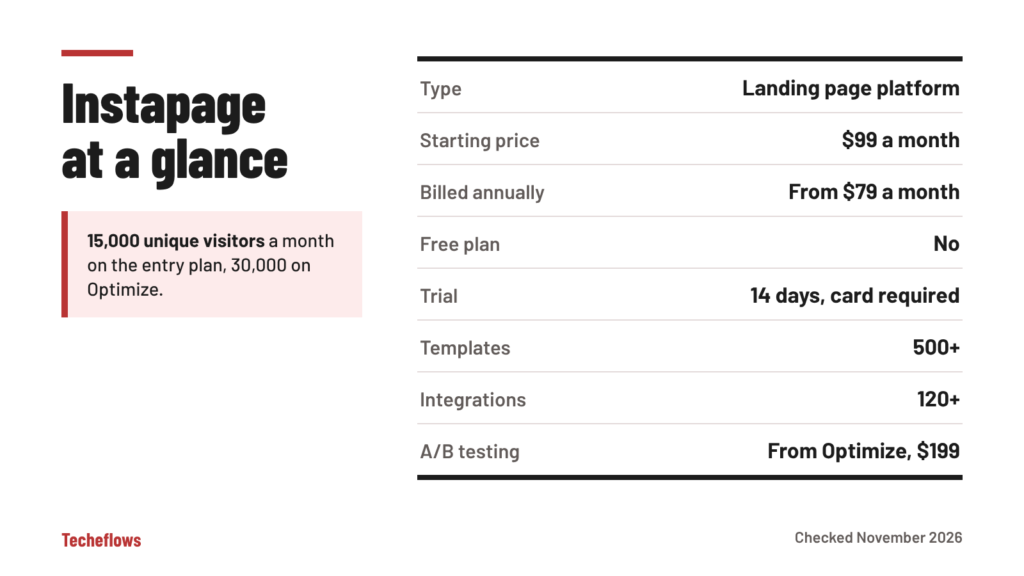
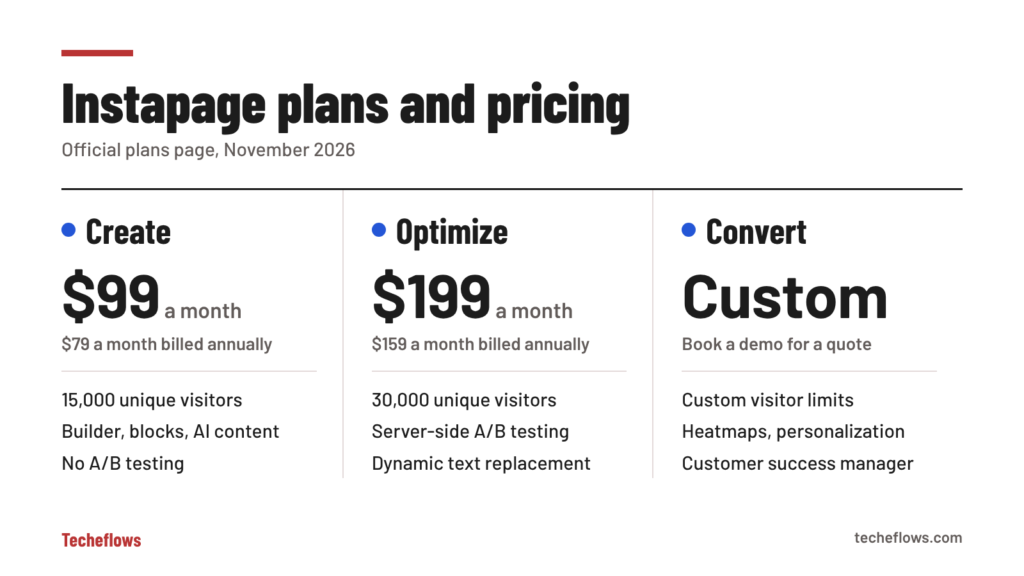
Instapage has three plans. There is no free plan. These are the prices on the official Instapage plans page as of November 2026.
| Plan | Monthly billing | Annual billing | Unique visitors per month | A/B testing |
|---|---|---|---|---|
| Create | $99 per month | $79 per month | 15,000 | No |
| Optimize | $199 per month | $159 per month | 30,000 (a 50,000 tier costs more) | Yes, server-side |
| Convert | Custom | Custom | Custom | Yes, plus heatmaps |
Annual billing saves up to 20%.
What Each Plan Includes
- Create: the landing page and website builder, reusable blocks and forms, real-time collaboration, popups and sticky bars, AI content, contacts and email, and Collections.
- Optimize: everything in Create, plus server-side A/B testing, hypothesis setting, experiment history, custom traffic splitting, scheduling, multi-step forms and dynamic text replacement.
- Convert: everything in Optimize, plus ad-to-page personalization, root domain publishing, heatmaps, direct lead bypass, and a customer success manager with professional services. You need to book a demo for a quote.
The Limits That Are Easy to Miss
- Visitor caps. Create includes 15,000 unique visitors a month. If your campaigns send more than that, you will need a higher tier.
- No testing on Create. A/B testing starts at $199 a month.
- Heatmaps are Convert-only.
- The trial needs a card. The 14-day trial gives you full plan features but is capped at 2,500 unique visitors. Cancel before it ends and you are not charged.
See Instapage plans and current pricing
Compare Create, Optimize and Convert on the official plans page and start a 14-day trial on the one that fits.
Which Instapage Plan Should You Choose?
Choose Create if you mainly need fast, good-looking pages and your traffic is modest. It suits a small team that wants to replace slow, generic website pages with focused campaign pages.
Choose Optimize if you spend real money on ads. Testing is how a landing page tool pays for itself, and this is the first plan that includes it. Dynamic text replacement alone can lift relevance for search campaigns.
Choose Convert if you are an enterprise or a large agency that needs audience-level personalization, heatmaps, root domain publishing and hands-on support.
A simple rule helps. If a 10% lift in conversion rate would not cover $199 a month, you are probably too early for Optimize, and you may be too early for Instapage.
What Do Users Say About Instapage?
Instapage holds a rating of 4.3 out of 5 on G2 from more than 500 reviews. On Capterra, which lists over 360 verified reviews, about 90% of the sentiment is positive.
The feedback is consistent across both sites.
- What users like: the builder is easy to learn, the template library is large, integrations work reliably, and support is responsive.
- What users dislike: the price, features locked to higher plans, the need to adjust mobile layouts by hand, and occasional technical hiccups.
Price is the most common complaint by a wide margin. Very few reviewers say the product is bad. Many say they wish it cost less.
Instapage Pros and Cons
Pros
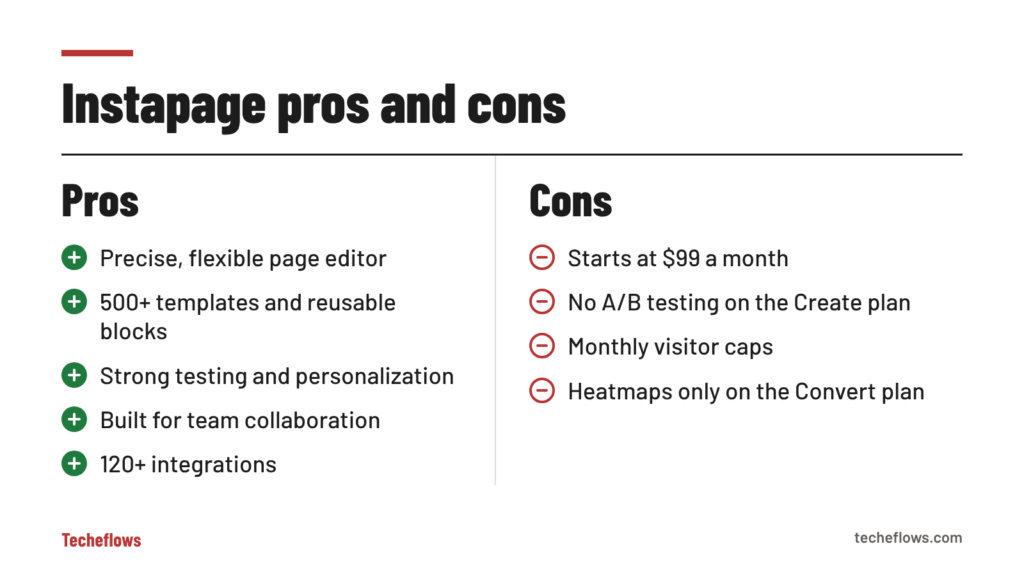
- Free-form, pixel-precise editor with custom code support
- More than 500 templates, plus reusable Instablocks and Global Blocks
- Server-side A/B testing and AI-driven experiments on Optimize
- AdMap and dynamic text replacement for ad-to-page message match
- Collections for building many page versions from one template
- Real-time collaboration with comments and secure sharing
- More than 120 integrations
- 14-day trial on Create and Optimize
Cons
- Starts at $99 a month, with no free plan
- No A/B testing on the entry plan
- Monthly visitor caps on every published tier
- Heatmaps and advanced personalization require the custom-priced Convert plan
- A card is required for the trial
- Mobile layouts often need manual adjustment
Instapage vs Leadpages: How Do They Compare?
Leadpages is the alternative most small businesses consider. It is cheaper to start with and has no traffic caps. Instapage gives designers more control and offers deeper collaboration and ad-mapping tools.
| Feature | Instapage | Leadpages |
|---|---|---|
| Lowest monthly price | $99 (Create) | $29 (Pro, publishing only) |
| Lowest plan with A/B testing | $199 (Optimize) | $99 (Grow) |
| Traffic limits | 15,000 visitors on Create, 30,000 on Optimize | No traffic caps |
| Heatmaps | Convert plan (custom price) | Optimize plan ($199) |
| Trial | 14 days | 7 days |
| Strongest point | Design control, collaboration, ad-to-page mapping | Lower entry price and AI-built pages |
If you are comparing the two, read our Leadpages review for the full breakdown of its plans.
Who Is Instapage Best For?
Instapage is a good fit if you:
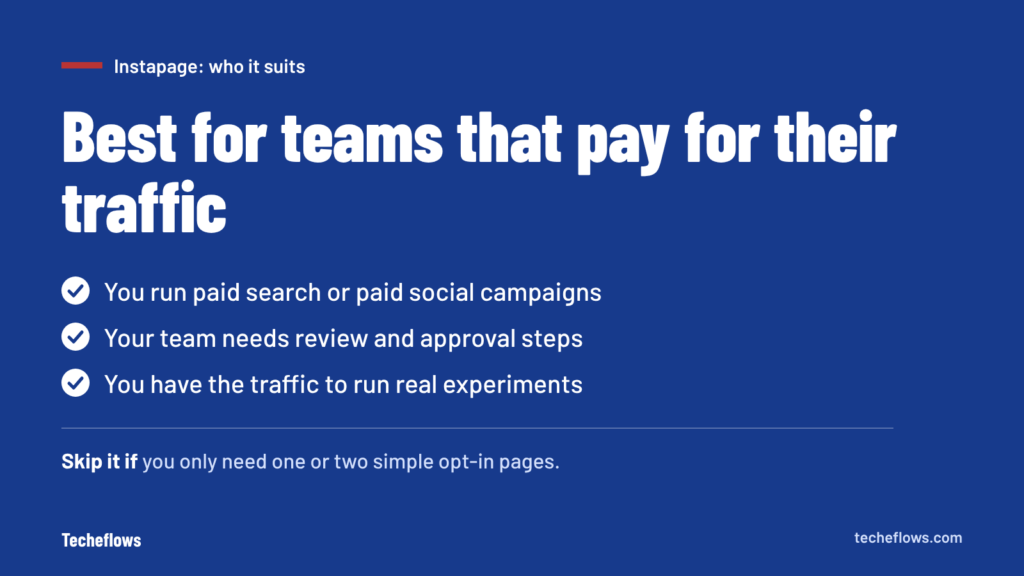
- Run paid campaigns on Google, Meta or LinkedIn and want a page per ad group
- Work in a team that needs review and approval before pages go live
- Manage many similar pages and want to update them in one place
- Care about precise, on-brand design
- Have the traffic to run meaningful experiments
Look elsewhere if you:
- Need only one or two simple opt-in pages
- Want A/B testing for under $100 a month
- Send high volumes of traffic and do not want visitor caps
- Prefer a tool with a free plan to learn on
How to Get the Most From the 14-Day Instapage Trial
Two weeks goes quickly, and the trial is capped at 2,500 unique visitors. A little preparation makes the result far more useful.
- Pick one live campaign. Test Instapage on an ad group that already gets clicks, so you have a baseline to compare against.
- Prepare your copy and images first. Do not spend the first week writing.
- Trial the plan you would actually buy. If testing matters to you, start on Optimize so you can try A/B experiments.
- Connect your CRM or email tool on day one. Confirm that leads arrive where you expect them.
- Check the page on a phone. Fix the mobile layout before you send traffic.
- Compare cost per lead. Judge the trial on results against your current page, not on how the editor feels.
- Set a calendar reminder for day 12. Decide before the card is charged.
Final Verdict: Is Instapage Worth It?
Instapage is a premium tool with premium pricing, and it makes the most sense where small conversion gains are worth real money. A team spending several thousand dollars a month on ads can recover the cost of the Optimize plan with a modest improvement in conversion rate.
For that kind of buyer, the combination of a precise editor, reusable blocks, server-side testing, AdMap and team collaboration is hard to match.
For a freelancer or a new business, the entry plan’s missing A/B testing and visitor cap make it a harder sell. Start with the 14-day trial, build one real campaign page, and judge it on results.
Try Instapage on a real campaign
Open a 14-day trial, publish one page for a live ad group and see how it converts. A card is required and you can cancel before the trial ends.
Frequently Asked Questions About Instapage
Is Instapage free?
No. Instapage does not have a free plan. It offers a 14-day trial on the Create and Optimize plans, and a card is required to start it.
How much does Instapage cost?
Create costs $99 a month, or $79 a month billed annually. Optimize costs $199 a month, or $159 a month billed annually. Convert is custom-priced.
Does Instapage include A/B testing?
Yes, from the Optimize plan up. The Create plan does not include A/B testing.
Does Instapage limit traffic?
Yes. Create includes 15,000 unique visitors a month and Optimize includes 30,000, with a higher 50,000 tier available. Custom limits are offered on the Convert plan.
Who owns Instapage?
Instapage has been part of airSlate since October 2023. It still operates under the Instapage name.
Can I use my own domain with Instapage?
Yes. You can publish pages to your own domain or subdomain. Publishing directly to a root domain is listed as a Convert plan feature.
Does Instapage work with WordPress?
Yes. WordPress is one of more than 120 listed integrations, along with Salesforce, HubSpot, Mailchimp, Google Ads and Zapier.
Is Instapage good for beginners?
The builder itself is beginner-friendly. The price is the main barrier. Beginners with a small budget may prefer to start on a cheaper tool and move up later.