
Introduction
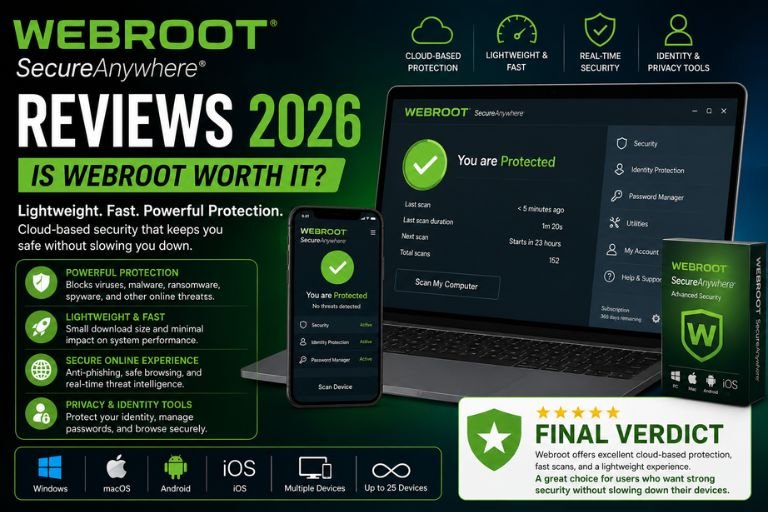
Cybersecurity has become more important than ever. With increasing threats such as malware, ransomware, phishing attacks, identity theft, spyware, and online scams, protecting your devices and personal information is no longer optional. Whether you’re a home user, remote worker, student, gamer, or business owner, reliable antivirus software plays a critical role in maintaining digital security.
Among the many antivirus solutions available today, Webroot SecureAnywhere has established itself as a lightweight and cloud-based security platform that focuses on speed, simplicity, and effective protection. Unlike traditional antivirus programs that often consume significant system resources, Webroot is known for its fast scans, minimal impact on device performance, and cloud-powered threat detection technology.
For over two decades, Webroot has provided cybersecurity solutions to millions of users worldwide. The company offers protection for PCs, Macs, smartphones, tablets, and businesses, making it a versatile security solution for both personal and professional use.
But is Webroot still worth buying in 2026?
This comprehensive review examines Webroot’s features, performance, malware protection, usability, customer support, pricing, advantages, disadvantages, and overall value.
What Is Webroot?
Webroot is a cybersecurity company that develops antivirus and internet security solutions for consumers and businesses.
Its security products include:
- Antivirus Protection
- Internet Security
- Identity Protection
- Password Management
- Anti-Phishing Protection
- Ransomware Protection
- Cloud-Based Threat Detection
- Business Endpoint Security
The company’s flagship product, Webroot SecureAnywhere, focuses on delivering fast and efficient protection while maintaining excellent system performance.
Unlike many competitors, Webroot relies heavily on cloud technology to identify and block threats in real time.
Why Webroot Is Popular
Several factors contribute to Webroot’s continued popularity.
Lightweight Design
One of Webroot’s biggest advantages is its small installation footprint.
Fast Performance
Scans complete significantly faster than many traditional antivirus programs.
Cloud-Based Security
Threat intelligence is continuously updated through cloud systems.
Easy Installation
Users can install and activate Webroot within minutes.
Multi-Device Protection
Protection is available across multiple operating systems.
These benefits appeal to users who want strong security without sacrificing device performance.
Installation Review
Installing Webroot is remarkably simple.
The process generally involves:
- Downloading the software
- Entering the activation key
- Completing installation
- Running the first scan
Most users can complete setup in just a few minutes.
Unlike some antivirus programs that require lengthy installations and large downloads, Webroot installs quickly and efficiently.
Many customers specifically praise this simplicity.
User Interface Review
Webroot’s interface is designed to be clean and user-friendly.
The dashboard provides quick access to:
- System Status
- Scanning Tools
- Security Settings
- Password Manager
- Identity Protection
The layout is easy to understand, even for users with limited technical knowledge.
Important information is clearly displayed without overwhelming the user.
Performance Review
Performance remains one of Webroot’s strongest selling points.
Many antivirus programs slow down devices by consuming CPU power, RAM, and storage resources.
Webroot takes a different approach.
Users frequently report:
- Faster startup times
- Minimal resource usage
- Smooth multitasking
- Little impact on system performance
This makes Webroot particularly attractive for older computers and low-spec devices.
Cloud-Based Security Technology
Webroot’s cloud-based architecture is one of its defining features.
Instead of storing large virus databases locally, Webroot uses cloud intelligence to identify threats.
Benefits include:
- Faster updates
- Reduced storage requirements
- Improved efficiency
- Real-time threat intelligence
This approach helps maintain strong protection without burdening the device.
Malware Protection Review
Malware remains one of the most common cybersecurity threats.
Webroot is designed to detect and remove:
- Viruses
- Trojans
- Worms
- Spyware
- Adware
- Rootkits
The software continuously monitors devices for suspicious activity.
Users generally report confidence in Webroot’s ability to detect known threats.
Ransomware Protection Review
Ransomware attacks continue to target individuals and businesses worldwide.
Webroot includes protections designed to identify and block ransomware behavior before files become encrypted.
Features include:
- Behavioral monitoring
- Threat detection
- Real-time analysis
- Automatic threat response
Many users appreciate having dedicated protection against one of today’s most dangerous cyber threats.
Real-Time Protection Review
Real-time protection is critical for modern cybersecurity.
Webroot continuously monitors:
- Downloads
- Applications
- Websites
- Email attachments
Threats can be identified and blocked before they cause damage.
This proactive approach helps reduce the risk of infection.
Scan Speed Review
One of Webroot’s most impressive features is scanning speed.
Users frequently report:
- Extremely fast scans
- Quick threat detection
- Minimal interruption
Compared to many traditional antivirus products, Webroot’s scans often finish in a fraction of the time.
This contributes significantly to the overall user experience.
Resource Usage Review
Resource efficiency is where Webroot truly stands out.
Benefits include:
- Low CPU usage
- Minimal memory consumption
- Small storage footprint
- Smooth performance during scans
Many users switch to Webroot specifically because their previous antivirus software slowed down their systems.
Identity Protection Review
Identity theft remains a growing concern.
Webroot offers features designed to help protect personal information.
Benefits include:
- Secure browsing
- Anti-phishing technology
- Credential protection
- Online privacy tools
These features help reduce the risk of personal information being compromised.
Password Management Review
Certain Webroot plans include password management functionality.
Benefits include:
- Secure password storage
- Strong password generation
- Credential management
- Simplified login processes
Password managers help users improve overall security by encouraging stronger password practices.
Anti-Phishing Protection Review
Phishing attacks continue to be one of the most common cyber threats.
Webroot helps protect users by identifying:
- Fraudulent websites
- Malicious links
- Fake login pages
- Suspicious online activity
Many users appreciate the additional protection while browsing the internet.
Web Browsing Security Review
Webroot enhances browsing security by monitoring online activity.
Protection includes:
- Website reputation analysis
- Safe browsing alerts
- Threat detection
- Download monitoring
These features help users avoid dangerous websites and malicious downloads.
Mobile Security Review
Webroot also provides mobile security solutions.
Features may include:
- App monitoring
- Device protection
- Privacy tools
- Safe browsing
As smartphones increasingly store sensitive information, mobile security becomes more important.
Many users appreciate having protection across multiple devices.
Gaming Performance Review
Gamers often avoid antivirus software that negatively impacts performance.
Webroot performs well in gaming environments because of its lightweight design.
Benefits include:
- Minimal background activity
- Low system impact
- Fast scanning
- Smooth gameplay
Many gamers appreciate the balance between security and performance.
Business Security Review
Webroot also serves businesses through endpoint protection solutions.
Business features include:
- Endpoint security
- Threat intelligence
- Device management
- Centralized monitoring
Organizations can manage multiple devices while maintaining strong cybersecurity standards.
Customer Support Review
Customer support receives generally positive feedback.
Support options include:
- Knowledge Base
- Email Support
- Phone Support
- Community Resources
Many customers report receiving helpful assistance when dealing with technical issues.
The support documentation is also extensive and useful.
Ease of Use Review
Ease of use remains one of Webroot’s strongest areas.
Users frequently praise:
- Simple setup
- Clean interface
- Easy navigation
- Automatic protection
Even users with little technical experience can use Webroot comfortably.
Pricing Review
Webroot offers several subscription options.
Pricing generally depends on:
- Number of devices
- Protection level
- Additional features
Compared to some premium cybersecurity suites, Webroot often remains competitively priced.
Many users believe the software provides strong value for money.
What Customers Love About Webroot
Positive reviews commonly mention:
Lightweight Performance
Minimal system impact.
Fast Scanning
Quick security checks.
Easy Installation
Simple setup process.
User-Friendly Interface
Easy for beginners.
Cloud-Based Security
Efficient threat detection.
Strong Real-Time Protection
Continuous monitoring.
Good Value
Affordable pricing options.
Common Complaints
Despite strong reviews, some criticisms exist.
Fewer Advanced Features
Some competitors offer more comprehensive security suites.
Interface Feels Basic
Advanced users may want more controls.
Cloud Dependence
Certain features rely heavily on internet connectivity.
Mixed Independent Test Results
Performance can vary depending on testing methodology.
Pros and Cons
Pros
- Extremely Lightweight
- Fast Installation
- Quick Scans
- Minimal System Impact
- Cloud-Based Protection
- Easy To Use
- Strong Malware Detection
- Real-Time Monitoring
- Competitive Pricing
Cons
- Fewer Extra Features Than Some Competitors
- Basic Interface
- Cloud Reliance
- Limited Advanced Customization
Who Should Use Webroot?
Webroot is ideal for:
- Home Users
- Students
- Remote Workers
- Families
- Small Businesses
- Gamers
- Older PC Owners
- Users Seeking Lightweight Security
It is especially beneficial for users who want strong protection without sacrificing performance.
Final Verdict
Webroot remains one of the most lightweight and efficient antivirus solutions available in 2026. Its cloud-based architecture, fast scanning technology, minimal resource usage, and strong real-time protection make it an attractive option for users who prioritize performance and simplicity.
While some competitors offer larger security suites with additional features, Webroot excels at delivering reliable protection without slowing down devices. For users looking for a fast, easy-to-use antivirus solution that provides solid security and excellent system performance, Webroot continues to be a strong contender in the cybersecurity market.
Overall, Webroot is a worthwhile investment for individuals and businesses seeking dependable protection, efficient performance, and a hassle-free cybersecurity experience.