
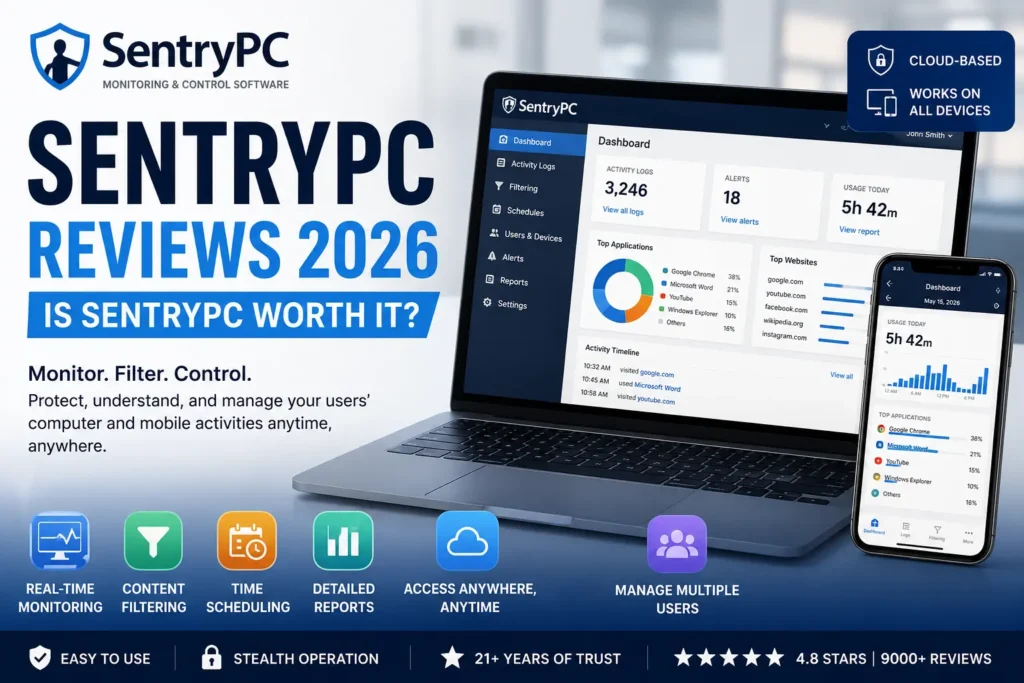
Managing device activity has become increasingly important for parents, businesses, schools, and organizations. With more time spent online, people want solutions that can help monitor computer usage, block unwanted content, manage screen time, and improve digital safety. This is where SentryPC has established itself as one of the leading cloud-based monitoring and control platforms.
SentryPC combines activity monitoring, content filtering, time management, and remote control capabilities into one platform. Whether you are a parent trying to protect your children online or a business owner looking to improve employee productivity, SentryPC offers tools designed to provide visibility and control over device usage.
Having been in the market for over two decades, SentryPC continues to attract users looking for an all-in-one monitoring solution. But does it really deliver what it promises?
This detailed SentryPC review explores its features, monitoring capabilities, ease of use, pricing value, advantages, disadvantages, and overall performance.
What Is SentryPC?
SentryPC is a cloud-based monitoring and control software designed to track, filter, and manage user activities across computers and mobile devices.
The software allows users to:
- Monitor device activity
- Track application usage
- View website history
- Set screen time schedules
- Block specific content
- Generate reports and charts
- Manage multiple devices remotely
Unlike traditional parental control software, SentryPC combines monitoring, content filtering, and time management into a single platform.
It is commonly used by:
- Parents
- Small businesses
- Large organizations
- Schools
- Educational institutions
- Remote teams
The platform supports:
- Windows
- Mac
- Android
- Chromebook
How Does SentryPC Work?
SentryPC works through a cloud-based dashboard.
After installing the software on a device, users can log into their secure online account and remotely manage settings from virtually anywhere.
The platform continuously records activity and sends the data to the dashboard, where users can view:
- Browsing history
- Application usage
- Search activity
- Login times
- Blocked attempts
- User reports
Changes to settings can be applied instantly without physically accessing the monitored device.
Why Is SentryPC Popular?
Several factors contribute to the popularity of SentryPC.
Cloud-Based Management
Users can access activity reports and settings remotely.
Real-Time Monitoring
Activities are recorded as they happen.
Content Filtering
Websites, applications, and keywords can be restricted.
Time Scheduling
Screen time limits and daily schedules are easy to create.
Multi-Platform Support
The software works across various operating systems.
Centralized Dashboard
Multiple users and devices can be managed from one account.
SentryPC Monitoring Features Review
Activity monitoring is one of SentryPC’s strongest capabilities.
The software tracks numerous activities, including:
Website History
Users can view websites visited and browsing behavior.
Application Usage
The software records which programs are used and for how long.
Search Activity
Search terms and online behavior are logged.
User Activity Logs
Detailed records show exactly when activities occurred.
Blocked Attempts
Attempts to access restricted websites or programs are recorded.
This level of monitoring helps provide greater visibility into user behavior.
Content Filtering Review
Content filtering is one of the most useful features offered by SentryPC.
Users can:
- Block websites
- Restrict applications
- Filter keywords
- Limit games
- Prevent access to certain programs
Parents often use these tools to create safer online environments for children.
Businesses can use content filtering to improve employee productivity and reduce distractions.
Time Management and Scheduling
Screen time management has become increasingly important.
SentryPC provides flexible scheduling tools that allow users to:
- Set daily limits
- Create weekly schedules
- Restrict device usage during certain hours
- Set maximum usage times
Parents frequently use these features to encourage healthier digital habits.
Businesses may use them to manage computer access and improve efficiency.
Real-Time Monitoring Review
Real-time monitoring is one of SentryPC’s standout features.
Users can instantly view:
- Active applications
- Recent activities
- Website visits
- Current usage behavior
This allows administrators and parents to react quickly when necessary.
The ability to see activity as it occurs provides greater control and awareness.
Cloud Dashboard Experience
The cloud dashboard is designed to simplify device management.
Users can access their accounts from:
- Desktop computers
- Laptops
- Tablets
- Smartphones
The dashboard provides:
- Activity reports
- Visual charts
- Settings management
- User profiles
- Device controls
Many customers appreciate not needing physical access to monitored devices.
Reporting and Analytics Review
SentryPC offers detailed reporting tools.
Users can generate:
Activity Reports
Comprehensive records of user behavior.
Top Usage Reports
See which applications or websites are used most frequently.
Charts and Visual Graphs
Visual data makes information easier to understand.
Downloadable Archives
Reports can be saved for future analysis.
These tools help businesses and parents understand usage patterns.
Employee Monitoring Review
Businesses commonly use SentryPC to improve productivity.
Features useful for companies include:
- Website monitoring
- Application tracking
- Usage reports
- Screen time management
- Centralized management
Managers can better understand how devices are being used during working hours.
Small businesses especially appreciate having a cloud-based solution without complex infrastructure requirements.
Parental Control Review
Parents represent one of the largest groups of SentryPC users.
Common parental control features include:
- Website blocking
- Screen time scheduling
- Application restrictions
- Activity reports
- Search monitoring
Many parents appreciate the ability to supervise online behavior without needing constant physical oversight.
The software helps encourage safer and more responsible technology use.
School Monitoring Review
Educational institutions use monitoring software to manage devices and student activity.
SentryPC helps schools:
- Restrict inappropriate websites
- Monitor computer usage
- Manage multiple users
- Control screen time
The centralized dashboard makes managing numerous devices much easier.
Multi-Device Management
One of SentryPC’s strongest advantages is centralized control.
Users can manage:
- Multiple computers
- Multiple users
- Different locations
- Various operating systems
This flexibility is particularly useful for:
- Families with several children
- Businesses with remote employees
- Schools managing many devices
Ease of Installation
Installation is straightforward.
The process generally involves:
- Downloading the software.
- Installing it on the device.
- Logging into the cloud account.
- Configuring settings.
Most users report that setup is relatively simple.
Even those without advanced technical knowledge can get started quickly.
User Interface Review
The dashboard interface is designed to be user-friendly.
Users appreciate:
- Simple navigation
- Organized reports
- Easy access to settings
- Clear charts
Most features are easy to locate, making the platform suitable for beginners and advanced users alike.
Device Compatibility
SentryPC supports several operating systems.
Compatible platforms include:
Windows
Ideal for home and office computers.
Mac
Useful for Apple users.
Android
Supports mobile device monitoring.
Chromebook
Popular among schools and educational institutions.
This broad compatibility increases the software’s appeal.
Performance Review
Many users report reliable performance.
Positive experiences include:
- Stable monitoring
- Accurate reports
- Fast cloud access
- Effective filtering
The software operates quietly in the background while maintaining system performance.
This helps avoid interruptions during daily usage.
Customer Support Review
Support options include:
- Installation guides
- Support center resources
- Contact assistance
- Documentation
Most customers report satisfactory support experiences.
The available guides help users solve many common problems independently.
What Customers Like About SentryPC
Positive reviews often mention:
Comprehensive Monitoring
Tracks numerous activities in detail.
Powerful Content Filtering
Blocks websites, apps, and keywords.
Flexible Scheduling
Allows precise screen time control.
Remote Access
Manage devices from anywhere.
Multi-Platform Compatibility
Works across several operating systems.
Centralized Dashboard
Easy management of multiple devices.
Real-Time Activity Monitoring
Instant visibility into user behavior.
Common Complaints
Although many users are satisfied, some concerns are occasionally mentioned.
Learning Curve
Advanced settings may require time to understand.
Privacy Concerns
Monitoring software should always be used responsibly and transparently where appropriate.
Subscription Costs
Long-term subscriptions can become expensive for large deployments.
Feature Complexity
First-time users may need time to learn all capabilities.
Pros and Cons
Pros
- Cloud-Based Dashboard
- Real-Time Monitoring
- Powerful Content Filtering
- Time Scheduling Features
- Multi-Platform Support
- Detailed Reports and Charts
- Centralized Device Management
- Suitable for Parents and Businesses
Cons
- Advanced Features Require Learning
- Subscription Costs Add Up
- Complex Settings for Beginners
- Privacy Considerations Must Be Managed Carefully
SentryPC Pricing
SentryPC offers flexible annual subscription plans for individuals, families, schools, and businesses. Every plan includes the same monitoring, content filtering, scheduling, and reporting features. Pricing mainly depends on the number of devices you need to manage.
Key pricing options include:
- Basic Plan: $69.95 per year for 1 device.
- Business 50 Plan: $1,495 per year for 50 devices.
- Business 100 Plan: $2,495 per year for 100 devices.
- Business 250 Plan: $4,995 per year for 250 devices.
- Business 500 Plan: $7,495 per year for 500 devices.
- Business 1,000 Plan: $9,995 per year for 1,000 devices.
Additional screenshot storage can also be added separately. Overall, SentryPC offers scalable pricing, making it suitable for parents, schools, and businesses that need reliable device monitoring and management.
Who Should Use SentryPC?
SentryPC is ideal for:
Parents
To manage children’s online activities and screen time.
Small Businesses
To improve productivity and monitor work devices.
Schools
To manage educational computers and internet access.
Organizations
To control multiple devices across different locations.
Remote Teams
To maintain oversight and device management.
Is SentryPC Worth It?
For users looking for an all-in-one monitoring, filtering, and device management solution, SentryPC delivers a powerful set of features. Its cloud-based dashboard, detailed activity tracking, content filtering, and scheduling tools provide excellent flexibility for parents, businesses, and schools.
The ability to monitor devices remotely, generate reports, and manage multiple users from one platform makes SentryPC a comprehensive solution compared to many traditional parental control or monitoring tools.
Final Verdict
SentryPC remains one of the most complete monitoring and control solutions available in 2026. Its combination of activity tracking, website filtering, screen time management, real-time monitoring, and centralized cloud access makes it a valuable tool for families, businesses, and educational institutions.
Whether you’re a parent trying to create safer digital habits, a business owner seeking greater productivity, or a school managing multiple devices, SentryPC offers a feature-rich platform that delivers strong performance and flexibility.
For users seeking comprehensive device monitoring and management, SentryPC continues to be a reliable and worthwhile solution.