Disclosure: This review contains affiliate links. If you sign up through them, Techeflows may earn a commission at no extra cost to you. Our reviews are research-based: we study the vendor’s published plans and feature lists, current pricing and public user feedback. Prices were checked in November 2026 and can change.
For years, Leadpages was the tool people recommended when someone asked, “How do I put up a landing page without hiring a developer?” It was simple, affordable and built around collecting email addresses.
The Leadpages of 2026 is a different product. It now calls itself an AI landing page builder and conversion platform. You describe what you sell, it drafts the page, and on higher plans it tests variations and sends traffic to the one that converts best.
The pricing has changed just as much. There are now five plans, from $29 to $399 a month, and older articles quoting the “Standard” and “Pro” plans are out of date.
This Leadpages review explains what the platform does today, what each plan includes, where the catches are, and who should use it.
A card is required. Check the trial terms shown at checkout.
In this review
- Leadpages Review: The Quick Verdict
- What Is Leadpages?
- What Has Changed at Leadpages?
- Leadpages Features: What Do You Get?
- How Does Leadpages Work?
- Leadpages Use Cases: What Can You Build?
- How Much Does Leadpages Cost in 2026?
- Which Leadpages Plan Should You Choose?
- What Do Users Say About Leadpages?
- Leadpages Pros and Cons
- Leadpages vs Instapage: How Do They Compare?
- Who Is Leadpages Best For?
- How to Get the Most From the 7-Day Leadpages Trial
- Final Verdict: Is Leadpages Worth It?
- Frequently Asked Questions About Leadpages
Leadpages Review: The Quick Verdict
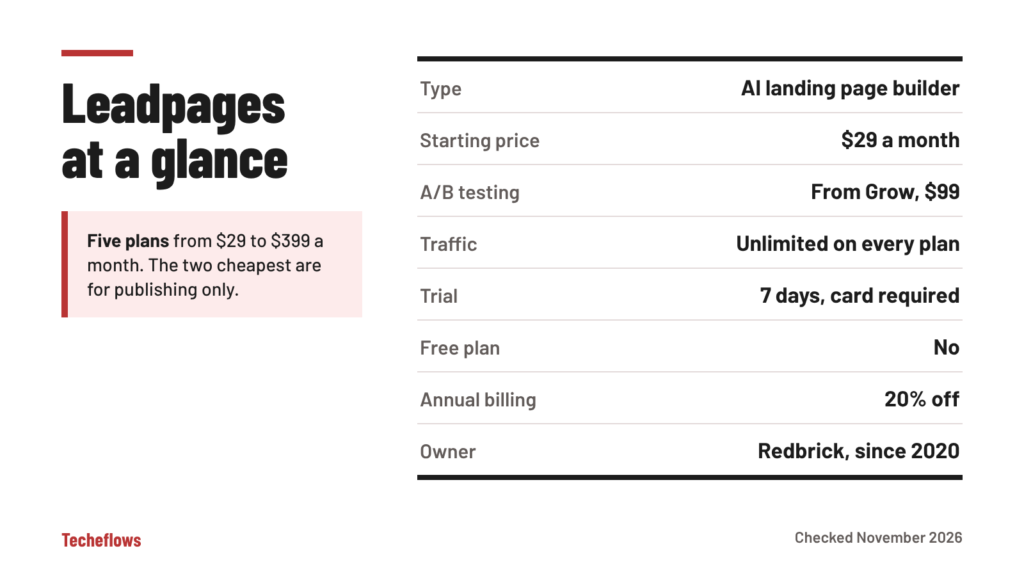
Leadpages is one of the easiest ways to get a professional landing page online, and its AI builder makes the first draft faster than ever. Every plan comes with unlimited traffic, which removes a cost that surprises users of some rival tools.
The catch is that the features most people associate with a conversion tool are tiered. A/B testing starts on the $99 Grow plan. Heatmaps and AI traffic routing start on the $199 Optimize plan. The two cheapest plans are for publishing pages only.
- Best for: small businesses, coaches, creators and lean marketing teams that want pages live quickly without traffic limits.
- Think twice if: you need pixel-level design freedom, large team workflows, or A/B testing on the cheapest plan.
What Is Leadpages?
Leadpages is a no-code platform for building landing pages, sales pages, lead capture pages, small websites and blogs. It launched in Minneapolis in 2012 and was acquired by Redbrick, a Canadian group of software companies, in March 2020.
The company says it has served more than 400,000 customers since 2012, and that its pages collect over 9 million leads a month.
Its current focus is conversion rate optimization. That is the practice of getting more visitors to take the action you want, whether that is joining a list, booking a call or buying a product. Leadpages combines an AI page generator, templates, testing, analytics and marketing integrations in one subscription.
What Has Changed at Leadpages?
If you used Leadpages a few years ago, or you are reading older reviews, three changes are worth knowing about.
- The plans are new. The old Standard and Pro tiers have been replaced by five plans: Pro, Business, Grow, Optimize and Enterprise. The name “Pro” now refers to the cheapest plan.
- The trial is shorter. Older articles mention a 14-day trial. The current pricing page lists 7 days.
- AI is at the center. Page creation, test suggestions, traffic routing and scheduled tasks are now driven by AI features that use a monthly credit allowance.
Leadpages also has a sister product called HTML Pub. It is a lower-cost service, starting at $10 a month, for publishing HTML pages you already have. If you want pages built and optimized for you, Leadpages is the product to look at.
Leadpages Features: What Do You Get?
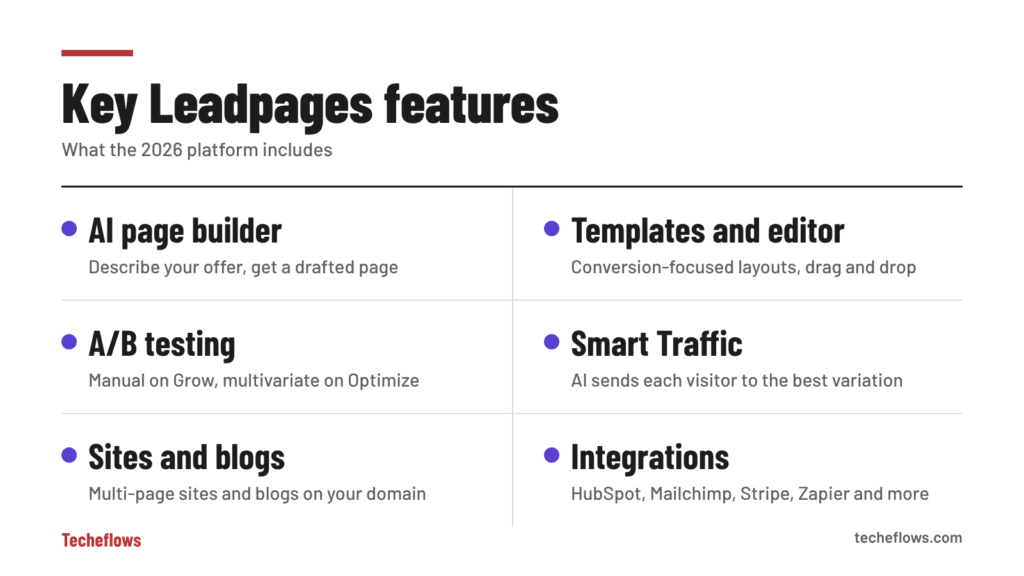
AI Page Builder
You describe your business and offer in plain language, and Leadpages generates a finished, on-brand page. It can produce landing pages, sales pages, lead generation pages and webinar registration pages.
Each plan includes a monthly allowance of AI credits, from 12,000 on Pro to 160,000 on Enterprise. Heavy users of the AI tools should keep an eye on that number.
Templates and Drag-and-Drop Editor
If you prefer to start from a proven layout, there is a library of conversion-focused templates and a drag-and-drop editor to customize them. The editor is section-based. That keeps pages tidy and mobile-friendly by default, although it gives you less free-form control than a pixel-precise canvas.
Brand Kit
A brand kit stores your logo, colors, fonts and tone of voice, and applies them automatically to new pages. Business includes one kit, and higher plans include more, which is useful if you manage several brands.
A/B Testing and Smart Traffic
The Grow plan adds manual A/B testing, so you can run a new version of a page against the current one. The Optimize plan adds multivariate testing with A, B, C and D versions.
Optimize also unlocks Smart Traffic. It uses AI to send each visitor to the variation most likely to convert for them, instead of waiting weeks for a single winner.
Heatmaps and Analytics
Analytics cover conversions, bounce rate, top traffic sources and UTM tracking, with CSV export. An Optimization Score highlights what to fix on a page. Click, scroll and attention heatmaps arrive with the Optimize plan.
Analytics history is kept for 12 months on Business and Grow, 24 months on Optimize and 36 months on Enterprise.
Personalization and Visitor Intelligence
Dynamic text replacement changes the wording on a page to match the ad or keyword a visitor clicked. From Grow up, Leadpages can also detect anonymous company traffic and enrich leads with extra details, within monthly limits that rise with each plan.
Sites and Blogs
Leadpages is no longer limited to single pages. You can build multi-page websites with shared navigation and footers, and run blogs on your own domain.
Routines and Ad Studio
Routines are scheduled tasks. Examples include a weekly blog post draft, monthly A/B test suggestions, lead recaps and performance reports. Ad Studio turns a product or URL into ad creatives and video ads in the formats different platforms need.
Forms, Pop-ups and Checkout
Lead capture forms, pop-ups and countdown timers are built in. You can also connect payment and store platforms to sell directly from a page.
Integrations, API and MCP Connector
Leadpages connects to the tools most small businesses already use. Named integrations include HubSpot, Salesforce, Mailchimp, Klaviyo, GetResponse, AWeber, MailerLite, Google Ads, Meta Ads, Google Analytics, Shopify, Stripe, Slack, Zapier and Make. More than 200 others are available, and webhooks cover the rest.
One limit to note is the number of active integrations. Business and Grow include 5, Optimize includes 10 and Enterprise includes 25.
From the Business plan up, there is also API access and an MCP connector, which lets you publish pages from AI assistants and coding tools.
How Does Leadpages Work?
- Choose a plan and start the trial. Every paid plan includes a 7-day trial.
- Create your first page. Describe your offer for the AI builder, or pick a template.
- Apply your brand. Add your logo, colors and fonts once in the brand kit.
- Edit the details. Adjust copy, images, forms and the call to action.
- Connect your tools. Link your email platform or CRM so new leads arrive automatically.
- Publish on your domain. Each plan includes at least one custom domain with SSL.
- Test and optimize. On Grow and above, run A/B tests. On Optimize, let Smart Traffic do the routing.
Leadpages Use Cases: What Can You Build?
Lead Magnets for Coaches and Consultants
The classic Leadpages use. Offer a guide, checklist or free session, collect an email address, and pass the new contact straight to your email platform.
Quote and Booking Pages for Local Businesses
A plumber, clinic or studio can publish a focused page for each service, with a short form or booking link, and send local ad traffic to it without worrying about visitor limits.
Sales Pages and Product Launches
Countdown timers, checkout connections and long-form sales templates cover simple launches without a separate funnel tool.
Webinar and Event Registration
The AI builder can draft a registration page from a short description, and confirmation details go to your email tool.
Bridge Pages for Bloggers and Affiliates
Publishers use short pre-sell pages to explain an offer before sending readers on. Unlimited traffic on every plan makes the cost easy to predict.
How Much Does Leadpages Cost in 2026?
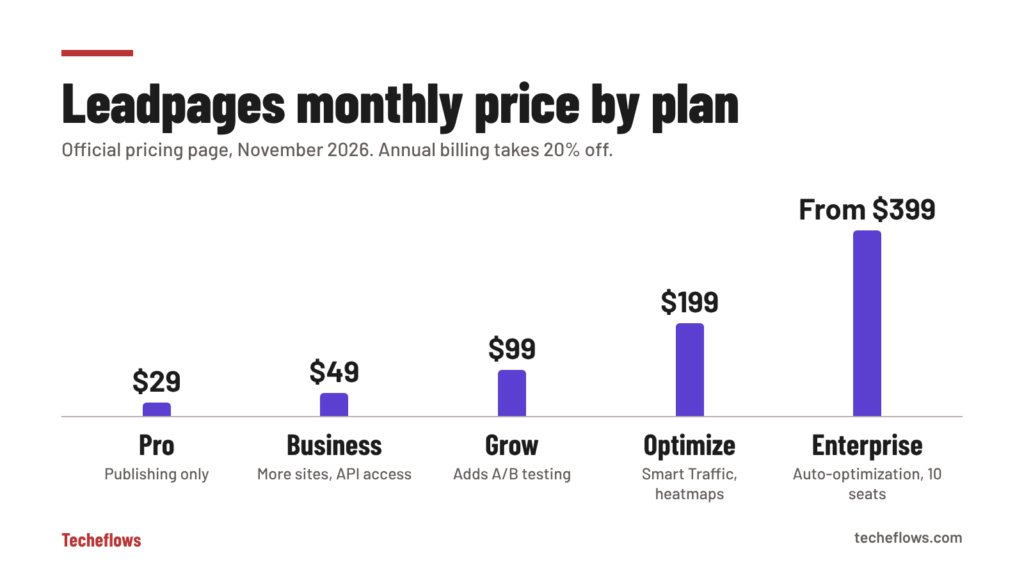
Leadpages has five plans. These are the monthly prices listed on the Leadpages website as of November 2026. Annual billing takes 20% off.
| Plan | Monthly price | Pages | Sites and domains | Testing and optimization |
|---|---|---|---|---|
| Pro | $29 | 25 | 1 custom domain | None (publishing only) |
| Business | $49 | 50 | 2 sites, 2 domains | None |
| Grow | $99 | Unlimited | 4 sites, 4 domains | Manual A/B testing, dynamic text |
| Optimize | $199 | Unlimited | 6 sites, 6 domains | Multivariate tests, Smart Traffic, heatmaps |
| Enterprise | From $399 | Unlimited | 10 sites, 10 domains | Full auto-optimization, 10 editing seats |
What Each Plan Adds
- Pro ($29): 25 pages, 1 custom domain with SSL, 1 blog and 12,000 AI credits a month. It is a publishing plan with no testing tools.
- Business ($49): 50 pages, 2 sites, 2 blogs, 10 GB of storage, 1 brand kit, 20,000 AI credits, 5 integrations, API access and the MCP connector.
- Grow ($99): unlimited pages, 4 sites, 3 blogs, manual A/B testing, dynamic text replacement, visitor detection and lead enrichment, and 40,000 AI credits. Leadpages marks this as its most popular plan.
- Optimize ($199): 6 sites, 5 blogs, multivariate testing, Smart Traffic, heatmaps, automatic personalization, performance alerts, 3 editing seats, 10 integrations and 80,000 AI credits.
- Enterprise (from $399): 10 sites, more test variations per page, a full auto-optimization loop, 10 editing seats, 25 integrations, 10 client workspaces, audit logs and a dedicated success manager.
Details Worth Knowing Before You Pay
- Traffic is unlimited on every plan. There are no visitor caps and no overage fees.
- The trial is 7 days and needs a card. It converts to a paid plan on day 7 unless you cancel. Check the amount shown at checkout before you confirm.
- There is no free plan.
- Extras cost more. Additional editing seats and additional domains are listed at $20 a month each.
- View-only seats are unlimited on every plan, which helps when clients only need to look.
- You can cancel any time from your account settings.
Compare Leadpages plans
See what Pro, Business, Grow and Optimize include today and start a 7-day trial on the plan that fits.
Which Leadpages Plan Should You Choose?
Choose Pro or Business if you only need to publish pages. A freelancer with one offer and one domain can run on Pro. Business is the better pick once you need a second site, a brand kit or integrations with your CRM.
Choose Grow if you send paid traffic to your pages. A/B testing is what turns a page builder into a conversion tool, and this is the cheapest plan that includes it. For most small businesses running ads, Grow is the sensible starting point.
Choose Optimize if you have enough traffic for heatmaps and Smart Traffic to learn from. As a rough guide, that means thousands of visitors a month and not just a few hundred.
Choose Enterprise if you are an agency or a larger team that needs client workspaces, more seats and hands-on support.
What Do Users Say About Leadpages?
Leadpages is rated 4.3 out of 5 on G2 from more than 230 reviews, and 4.5 out of 5 on Capterra from around 300 reviews.
- What users like: pages are quick to build, the templates look professional, the learning curve is short, and connecting an email platform is simple.
- What users dislike: value for money is the most common complaint, some reviewers describe frustration with billing and renewals, and long-time users mention limited customization in the older editor.
Two practical lessons come out of the negative reviews. Put the trial end date in your calendar, and read the billing terms at checkout. Most billing complaints come from renewals that people did not expect.
Leadpages Pros and Cons
Pros
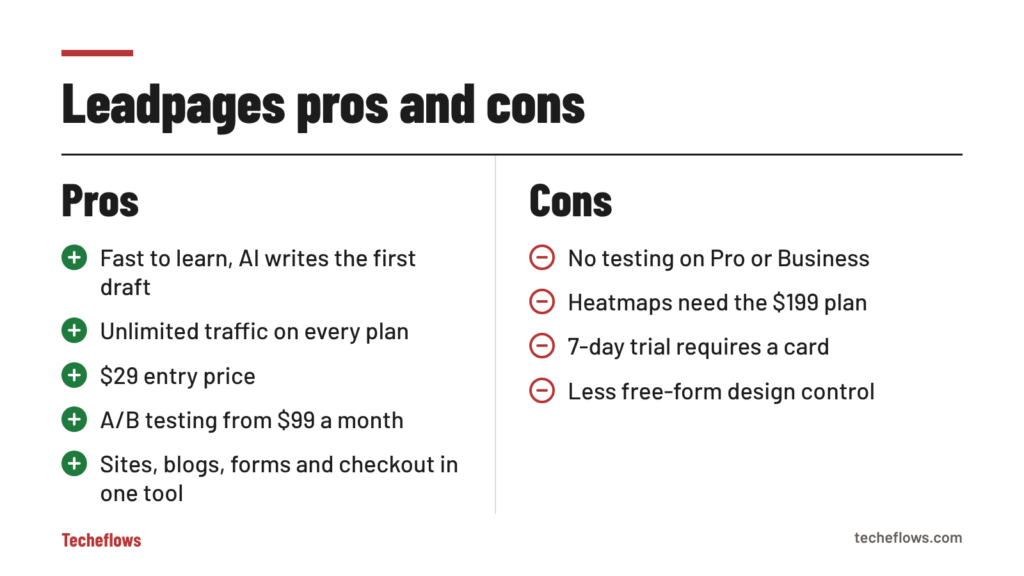
- Fast to learn, with an AI builder that writes the first draft
- Unlimited traffic on every plan, with no overage fees
- Low $29 entry price for simple publishing
- A/B testing from $99 a month
- Websites, blogs, forms, pop-ups and checkout in one tool
- Wide range of email, CRM and ad integrations
- API access and an MCP connector for AI workflows
- Unlimited view-only seats
Cons
- No A/B testing on the Pro and Business plans
- Heatmaps and Smart Traffic require the $199 Optimize plan
- Page limits on the two cheapest plans
- Short 7-day trial that requires a card
- No free plan
- Extra editing seats and domains cost $20 a month each
- Less free-form design control than pixel-precise builders
Leadpages vs Instapage: How Do They Compare?
Instapage is the premium alternative. It offers more design freedom and stronger team collaboration, but it costs more and caps monthly visitors.
| Feature | Leadpages | Instapage |
|---|---|---|
| Lowest monthly price | $29 (Pro, publishing only) | $99 (Create) |
| Lowest plan with A/B testing | $99 (Grow) | $199 (Optimize) |
| Traffic limits | None | 15,000 visitors on Create, 30,000 on Optimize |
| Heatmaps | Optimize plan ($199) | Convert plan (custom price) |
| Trial | 7 days | 14 days |
| Strongest point | Lower entry price, AI-built pages, no traffic caps | Design control, collaboration, ad-to-page mapping |
For the other side of this comparison, see our Instapage review.
Who Is Leadpages Best For?
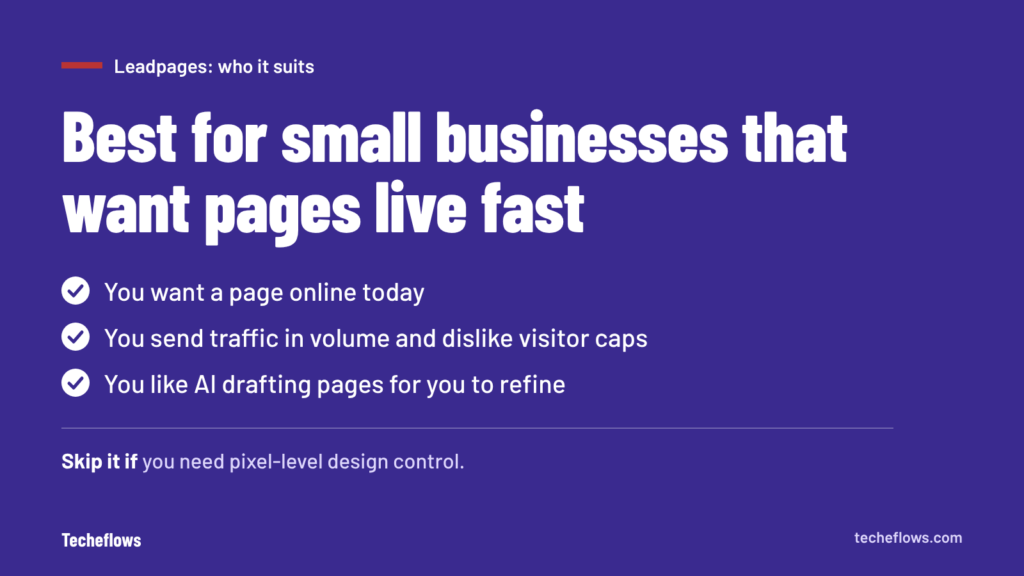
Leadpages is a good fit if you:
- Run a small business, coaching practice or creator brand
- Want a page live today without learning a complex editor
- Send traffic in volume and do not want to pay per visitor
- Need landing pages, a simple site and a blog in one place
- Like the idea of AI drafting pages for you to refine
Look elsewhere if you:
- Need pixel-level design control
- Have a large team with approval workflows
- Want A/B testing or heatmaps on the cheapest plan
- Need a full sales funnel with courses and memberships built in
How to Get the Most From the 7-Day Leadpages Trial
Seven days is enough to judge Leadpages if you arrive prepared.
- Have one real offer ready. Write down who it is for, what they get and what you want them to do.
- Gather your brand assets. Logo, colors, fonts and two or three good images are all you need for the brand kit.
- Trial the plan you expect to keep. If you want A/B testing, start on Grow and not on Pro.
- Let the AI builder write the first draft. Then edit it in your own voice.
- Connect your email platform early. Send yourself a test lead to confirm it arrives.
- Send some real traffic. Even a small ad budget or one email to your list will show how the page performs.
- Set a reminder for day 6. Decide before the trial converts to a paid plan.
Final Verdict: Is Leadpages Worth It?
Leadpages remains one of the most approachable landing page tools, and the 2026 version is more capable than the product many people remember. The AI builder shortens the path from idea to live page, and unlimited traffic on every plan keeps costs predictable.
The main thing to get right is the plan. Pro and Business are publishing plans. If you want to test and improve conversion rates, budget for Grow at $99 a month, and consider Optimize once your traffic is high enough to make heatmaps and Smart Traffic useful.
Use the 7-day trial with a real offer, not a test page. A week is short, so have your copy and images ready before you start.
Build your first page this week
Start a 7-day Leadpages trial, publish a real offer and see how it converts. A card is required and you can cancel from your account settings.
Frequently Asked Questions About Leadpages
Is Leadpages free?
No. There is no free plan. Every paid plan includes a 7-day trial, and a card is required to start it.
How much does Leadpages cost?
Monthly prices are $29 for Pro, $49 for Business, $99 for Grow, $199 for Optimize and from $399 for Enterprise. Annual billing is 20% cheaper.
Does Leadpages limit traffic?
No. Leadpages states that traffic is unlimited on every plan and that there are no overage fees.
Which Leadpages plan includes A/B testing?
A/B testing starts on the Grow plan at $99 a month. Multivariate testing, Smart Traffic and heatmaps start on the Optimize plan at $199 a month.
Who owns Leadpages?
Leadpages has been owned by Redbrick, a Canadian software group, since March 2020. It was founded in Minneapolis in 2012.
Can I use my own domain with Leadpages?
Yes. Pro includes 1 custom domain with SSL, Business includes 2, Grow 4, Optimize 6 and Enterprise 10.
Does Leadpages work with Mailchimp and HubSpot?
Yes. Both are named integrations, along with Salesforce, Klaviyo, AWeber, Google Ads, Shopify, Stripe and Zapier.
How do I cancel Leadpages?
You can cancel at any time from your account settings. Plan changes take effect at the next billing cycle, so cancel before the trial or the current period ends.