
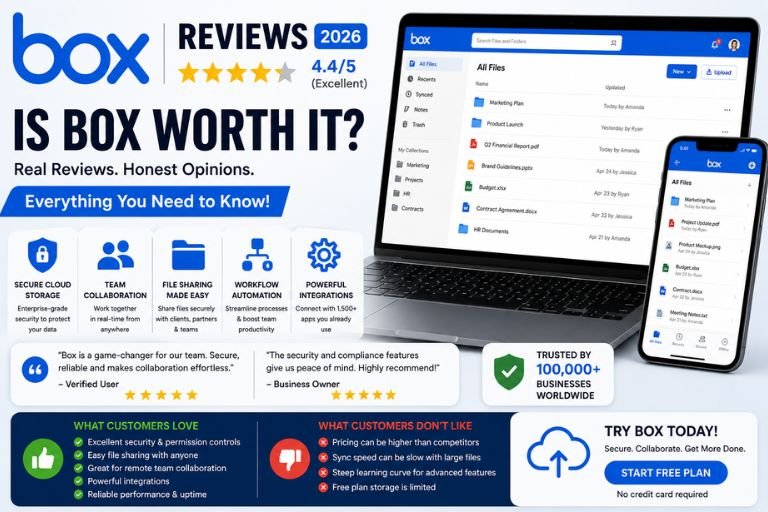
Cloud storage has become an essential tool for businesses of all sizes. Whether you’re managing documents, collaborating with remote teams, sharing files with clients, or maintaining compliance requirements, having a secure and reliable cloud platform is critical.
Among the many cloud storage providers available today, Box has established itself as one of the leading enterprise-focused solutions. Unlike many consumer-oriented cloud storage services, Box is designed specifically for businesses that require advanced security, collaboration tools, content management, and compliance features.
But is Box worth using in 2026?
In this comprehensive review, we’ll explore Box’s features, performance, customer experiences, security, pricing, advantages, disadvantages, and whether it remains one of the best cloud storage platforms available.
What Is Box?

Box is a cloud content management and file-sharing platform that allows businesses to securely store, organize, share, and collaborate on files from anywhere.
The platform serves organizations ranging from small businesses to large enterprises and offers solutions for:
- Cloud storage
- File sharing
- Team collaboration
- Workflow automation
- Document management
- Compliance management
- Secure content governance
- Digital asset management
Over the years, Box has evolved beyond simple cloud storage and now provides a complete content management ecosystem.
Why Businesses Choose Box
Many organizations choose Box because it offers far more than simple file storage.
Key reasons include:
- Enterprise-level security
- Advanced permission controls
- Compliance support
- Team collaboration
- Workflow automation
- Large-scale document management
- Integration with business software
For businesses handling sensitive information, these capabilities can be extremely valuable.
First Impressions
One of the first things users notice about Box is its clean and professional interface.
The dashboard is organized and designed to help users quickly access:
- Files
- Folders
- Shared content
- Collaborations
- Recent activity
Most users find the platform intuitive once they become familiar with its structure.
The overall design feels polished and business-oriented.
File Storage and Organization
At its core, Box provides secure cloud storage.
Users can upload and organize:
- Documents
- PDFs
- Images
- Videos
- Presentations
- Spreadsheets
- Contracts
- Large project files
The folder system is flexible and allows businesses to create detailed organizational structures.
Many users appreciate how easy it is to maintain large document libraries.
File Sharing Reviews
File sharing is one of Box’s strongest features.
Users can share content through:
- Shared links
- Invitations
- Team folders
- External collaboration
Advanced permission settings allow administrators to control:
- Viewing access
- Editing permissions
- Download restrictions
- Expiration dates
These controls make Box particularly useful for organizations working with clients, vendors, and external partners.
Collaboration Features
Modern businesses require seamless collaboration.
Box offers a wide range of collaboration tools including:
- Shared workspaces
- Document comments
- Task assignments
- Version tracking
- Real-time collaboration
Teams can work together on projects without constantly emailing files back and forth.
This improves productivity and reduces confusion.
Many organizations report that Box helps centralize communication around documents and projects.
Security Reviews
Security is one of Box’s biggest strengths.
Many businesses choose Box specifically because of its security features.
Key security capabilities include:
- Encryption
- Multi-factor authentication
- Access controls
- Permission management
- Security monitoring
- Data loss prevention
- Audit logs
These features help organizations protect sensitive business information.
Industries such as healthcare, finance, legal services, and government often prioritize security when choosing cloud storage providers.
Compliance Features
Compliance requirements continue to become more complex.
Box supports various compliance frameworks and regulations through features such as:
- Retention policies
- Audit trails
- Governance controls
- Content classification
- Legal holds
Organizations with strict regulatory obligations often find these tools valuable.
Compliance support is one reason Box remains popular among larger enterprises.
Workflow Automation
One area where Box stands out is workflow automation.
Businesses can automate repetitive processes such as:
- Document approvals
- File routing
- Content reviews
- Employee onboarding
- Contract management
Automation reduces manual work and improves operational efficiency.
Many organizations use Box workflows to streamline business processes.
Box Drive Experience
Box Drive allows users to access cloud files directly from their desktop computers.
Benefits include:
- Local file access
- Automatic syncing
- Reduced storage usage
- Easy cloud integration
Many users enjoy being able to work with cloud files as if they were stored locally.
This creates a seamless experience between cloud storage and desktop workflows.
Mobile App Reviews
The Box mobile app allows users to:
- Access files
- Share documents
- Upload content
- Review projects
- Collaborate remotely
The app is available for both Android and iOS devices.
Most users find the mobile experience reliable and useful for accessing content while traveling or working remotely.
Integration Capabilities
Integration is one of Box’s strongest competitive advantages.
The platform connects with many popular business tools including:
- Microsoft 365
- Google Workspace
- Slack
- Zoom
- Salesforce
- Adobe
- ServiceNow
These integrations allow businesses to incorporate Box into existing workflows without disrupting operations.
Many customers view integrations as one of the platform’s most valuable features.
Performance Reviews
Performance is generally considered strong.
Users frequently report:
- Reliable uptime
- Stable access
- Consistent availability
Most businesses can depend on Box for daily operations without major interruptions.
The platform performs particularly well when managing large document libraries.
Customer Support Reviews
Customer support receives generally positive feedback.
Support options include:
- Online documentation
- Help center
- Support tickets
- Business support plans
Customers often praise:
- Professional assistance
- Helpful representatives
- Detailed knowledge base
Larger business customers typically report the best support experiences.
Pricing Reviews
Pricing is one of the most debated aspects of Box.
Many customers acknowledge that Box is not the cheapest cloud storage platform available.
However, supporters argue that the additional cost is justified by:
- Advanced security
- Compliance tools
- Collaboration features
- Enterprise capabilities
Small businesses sometimes find the pricing higher than consumer-focused alternatives.
User Experience Reviews
Most users describe the overall experience as:
- Professional
- Reliable
- Secure
- Organized
The platform is generally well suited for business environments.
However, some users mention that new administrators may require time to learn the advanced settings and permission structures.
Common Customer Complaints
Despite strong reviews overall, Box does receive criticism in certain areas.
Pricing
Many users feel the platform costs more than alternatives.
Learning Curve
Advanced features can be complex for beginners.
Syncing Issues
Some customers occasionally report synchronization delays.
Storage Limits on Lower Plans
Smaller plans may feel restrictive for growing businesses.
What Customers Like Most
The most frequently praised aspects of Box include:
Security
Businesses trust the platform’s security infrastructure.
Collaboration
Teams can work together efficiently.
Organization
Large file libraries remain manageable.
Compliance
Strong governance capabilities.
Reliability
Consistent performance and uptime.
Box vs Google Drive
Google Drive is often considered easier for casual users.
However, Box typically offers:
- Better security controls
- Stronger compliance tools
- More advanced permissions
- Better enterprise management
Organizations with strict security requirements often prefer Box.
Box vs Dropbox
Dropbox is known for simplicity and fast syncing.
Box generally provides:
- More enterprise features
- Better compliance tools
- Stronger content governance
- Advanced administrative controls
Businesses often choose Box when they require more control over content management.
Pros of Box
Strong Security
Excellent protection for business data.
Advanced Collaboration
Powerful team collaboration features.
Enterprise Management
Comprehensive administrative controls.
Workflow Automation
Helps streamline business operations.
Excellent Integrations
Works with major business applications.
Reliable Performance
Stable and dependable platform.
Cons of Box
Higher Cost
More expensive than some alternatives.
Learning Curve
Advanced features require training.
Complex Administration
May feel overwhelming for small teams.
Syncing Can Occasionally Lag
Large file transfers may experience delays.
Who Should Use Box?
Box is ideal for:
- Enterprises
- Large organizations
- Healthcare providers
- Financial institutions
- Legal firms
- Government agencies
- Remote teams
- Businesses handling sensitive information
The platform is particularly valuable for organizations that prioritize security and compliance.
Who Might Prefer Alternatives?
You may want another solution if:
- You only need personal cloud storage
- Budget is your primary concern
- You prefer simpler tools
- You do not require advanced security features
Smaller teams may find simpler alternatives sufficient for basic file storage needs.
Final Verdict
Box remains one of the strongest enterprise cloud storage and content management platforms available in 2026.
Its combination of:
- Advanced security
- Collaboration tools
- Compliance features
- Workflow automation
- Business integrations
- Reliable performance
makes it an excellent choice for organizations that need more than simple cloud storage.
While pricing may be higher than some competitors, many businesses find the additional capabilities worth the investment.
For companies managing sensitive documents, large teams, regulatory requirements, or complex workflows, Box continues to be one of the most reliable and feature-rich cloud content management solutions available today.