
Introduction
Artificial intelligence has transformed the way people research, write, brainstorm, and manage information. From content creators and marketers to students, developers, and business professionals, AI-powered workspaces are becoming essential productivity tools. However, many AI platforms still rely on traditional chat interfaces, which can make it difficult to organize complex ideas and long-term projects.
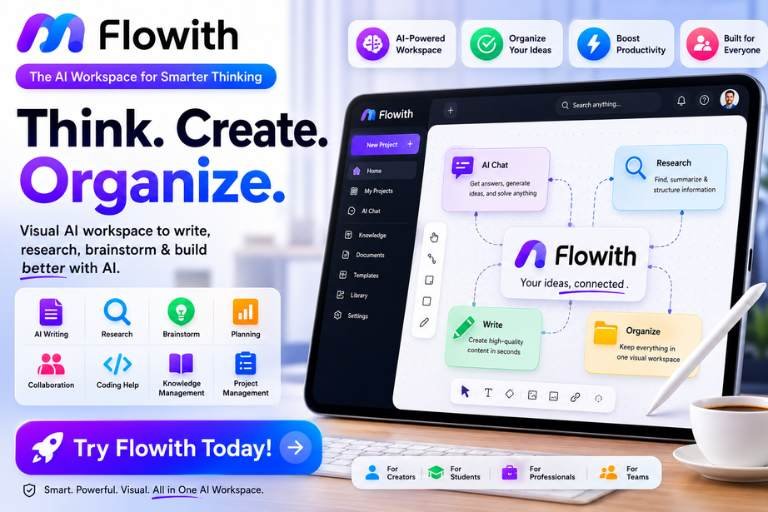
Flowith takes a different approach by combining AI assistance with a visual workspace. Instead of limiting users to a single chat window, Flowith organizes conversations, research, notes, and generated content into an interactive canvas. This makes it easier to connect ideas, manage large projects, and collaborate with AI in a more intuitive way.
But is Flowith worth using in 2026?
This review explores Flowith’s features, interface, AI capabilities, performance, pricing, pros, cons, and overall value.
What Is Flowith?
Flowith is an AI-powered workspace designed to help users brainstorm, research, write, and organize information using a visual canvas.
The platform combines advanced AI models with project management features to create a more flexible workflow than traditional AI chatbots.
Flowith supports:
- AI Writing
- Research Assistance
- Brainstorming
- Visual Knowledge Mapping
- Document Creation
- Project Planning
- Team Collaboration
- Content Generation
Why Flowith Is Popular
Flowith has gained attention because it offers a unique way to interact with AI.
Key highlights include:
- Visual AI workspace
- Organized conversations
- Multiple AI models
- Interactive knowledge mapping
- Modern interface
- Creative workflow support
First Impressions
The platform immediately feels different from standard AI chat tools.
Instead of a single conversation window, users work on an expandable canvas where ideas, prompts, and AI responses remain connected.
The interface feels:
- Modern
- Creative
- Organized
- Professional
User Interface Review
Flowith’s interface is one of its biggest strengths.
Users can:
- Create AI conversations
- Build visual workflows
- Connect ideas
- Organize research
- Save projects
- Continue previous work easily
The layout helps reduce clutter during large projects.
AI Writing Review
Flowith performs well for content creation.
It can assist with:
- Blog Articles
- Marketing Copy
- Product Descriptions
- Emails
- Reports
- Social Media Posts
- Brainstorming
The AI generates clear, structured responses that can be refined further within the workspace.
Research Features
Research is another major strength.
Users can organize:
- Sources
- AI Responses
- Notes
- Ideas
- Questions
Instead of scrolling through long conversations, everything stays visually connected.
Brainstorming Experience
Flowith excels at brainstorming.
Whether you’re planning a business, designing a website, or outlining a book, the visual canvas makes it easy to explore multiple ideas simultaneously.
Many users find this approach more natural than traditional chat interfaces.
Performance Review
Performance is generally smooth.
Users commonly report:
- Fast AI responses
- Responsive interface
- Stable performance
- Quick project loading
The platform handles large workspaces efficiently.
Organization Features
Unlike many AI tools, Flowith helps organize information instead of simply generating text.
Projects can be structured into logical sections, making long-term work easier to manage.
Collaboration
Flowith supports collaborative workflows, making it useful for teams working on shared research, planning, or content creation.
Businesses and agencies can benefit from centralized project organization.
Ease of Use
Although the interface introduces a different workflow, it becomes intuitive after a short learning period.
Beginners may need some time to understand the canvas system, but once familiar, navigation feels efficient.
AI Models
Flowith supports access to advanced AI models, giving users flexibility depending on the type of task they are performing.
Different models may perform better for writing, reasoning, coding, or creative work.
Productivity
Flowith is particularly valuable for users handling complex projects.
Instead of losing information in endless chats, users maintain structured workspaces that grow over time.
This improves productivity and reduces repeated work.
Pricing Review
Flowith offers different subscription options designed for individual users and professionals.
Higher-tier plans generally provide:
- More AI usage
- Additional workspace features
- Priority access
- Enhanced productivity tools
Users should compare plans based on expected usage.
Customer Support
Support resources typically include:
- Help Center
- Documentation
- Email Support
- Tutorials
The learning materials make onboarding easier for new users.
What Users Like
Many users appreciate:
- Innovative canvas interface
- Excellent organization
- AI-powered research
- Strong writing assistance
- Modern design
- Productive workflows
- Multiple AI capabilities
- Creative brainstorming
Common Drawbacks
Some users mention:
- Learning curve compared to standard chatbots
- Premium features require paid plans
- Heavy projects may take time to organize
- Beginners may initially prefer a simpler interface
Pros
- Innovative Visual Workspace
- Excellent Organization
- Powerful AI Writing
- Strong Research Tools
- Great Brainstorming Features
- Modern Interface
- Supports Complex Projects
- Productivity Focused
- Suitable for Teams
- Regular Feature Updates
Cons
- Learning Curve for New Users
- Premium Subscription Required for Full Features
- More Complex Than Basic AI Chatbots
- Best Experience Comes With Regular Use
Who Should Use Flowith?
Flowith is an excellent choice for:
- Content Creators
- Writers
- Researchers
- Students
- Developers
- Marketing Teams
- Agencies
- Entrepreneurs
- Product Managers
- Business Professionals
It is especially valuable for users managing long-form projects or complex research.
Final Verdict
Flowith stands out from traditional AI assistants by offering a visual, organized workspace rather than a simple chat interface. Its canvas-based approach makes brainstorming, research, writing, and project management significantly more structured and efficient.
While there is a slight learning curve, the platform rewards users with improved organization, better productivity, and a more flexible way to work with AI. It is particularly well-suited for professionals who need to manage large amounts of information across multiple projects.
Overall Rating: ⭐⭐⭐⭐⭐ (4.8/5)
If you’re looking for an AI platform that goes beyond basic conversations and helps you organize ideas, research, and creative work in one place, Flowith is a strong choice in 2026.